Not every customer support request involves changing products or correcting shipping addresses.
Sometimes the customer simply needs to adjust the quantity of items they have already purchased.
A shopper may accidentally order one unit instead of three, purchase too many items, or decide to increase their order shortly after checkout.
While these requests seem simple, Magento 2's default order management workflow makes quantity changes surprisingly difficult.
In this guide, we'll explore why quantity adjustments occur, the challenges Magento merchants face, and how to efficiently update quantities without canceling and recreating orders.
Why Customers Request Quantity Changes
Quantity modifications are common in nearly every online store.
Some of the most frequent reasons include:
- Customer accidentally ordered too few items
- Customer entered the wrong quantity during checkout
- Customer wants to purchase additional units
- Customer wants to reduce the order amount
- Customer is ordering for family members or colleagues
- Customer changes their purchasing decision shortly after checkout
Most of these requests happen within minutes or hours after the order is placed.
The Problem With Magento's Default Workflow
Magento considers an order a finalized transaction once checkout is complete.
Because of this, administrators cannot simply open an order and edit quantities through the standard Magento admin panel.
Many merchants resort to:
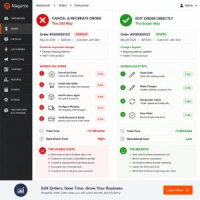
- Canceling the order
- Creating a replacement order
- Re-entering products
- Updating quantities manually
- Processing a new order
This process consumes time and increases operational complexity.
Real Business Example
Imagine a wholesale customer places an order for:
- 10 T-Shirts
- 5 Hoodies
- 2 Jackets
Ten minutes later, they realize they actually need:
- 20 T-Shirts
- 5 Hoodies
- 2 Jackets
The customer doesn't need a different product.
They simply need a quantity adjustment.
Canceling and recreating the entire order creates unnecessary work.
Why Quantity Changes Affect More Than Quantity
Many store owners assume changing quantity only affects item counts.
In reality, several order components may change:
- Subtotal
- Discount Amounts
- Tax Amounts
- Shipping Costs
- Grand Total
This is why quantity updates should trigger automatic order recalculations.
Inventory Considerations
Inventory management is another important factor.
When increasing quantities, administrators need to verify stock availability.
When decreasing quantities, inventory should be returned appropriately.
Accurate stock management helps prevent overselling and fulfillment issues.
Benefits of Editing Quantities Directly
- Faster customer service
- Reduced order cancellations
- Better inventory accuracy
- Improved customer satisfaction
- Less administrative work
- More efficient order processing
Common Quantity Adjustment Scenarios
Increase Ordered Quantity
A customer initially purchases one product but decides to buy additional units before shipment.
Reduce Ordered Quantity
A customer realizes they purchased more items than needed and requests a reduction.
Correct Checkout Mistakes
Typing errors during checkout occasionally result in incorrect quantities being ordered.
Business and Wholesale Orders
Large B2B orders frequently require quantity adjustments before fulfillment begins.
How MageHQ Order Editor Helps
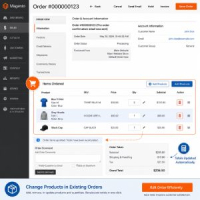
MageHQ Order Editor allows administrators to update product quantities directly from the Magento backend.
Store managers can:
- Increase quantities
- Decrease quantities
- Update order totals automatically
- Adjust taxes and discounts
- Maintain the original order record
- Avoid unnecessary order cancellations
Best Practices
- Verify inventory availability before increasing quantities
- Review updated order totals carefully
- Notify customers about quantity changes
- Maintain an audit trail of modifications
- Apply updates before shipment creation whenever possible
Conclusion
Quantity adjustments are a routine part of eCommerce operations.
Whether customers need to increase or decrease quantities, merchants benefit from a workflow that allows modifications without canceling and recreating orders.
A dedicated Magento 2 Order Editor helps administrators process quantity changes faster, maintain accurate order records, and improve customer satisfaction.
Frequently Asked Questions
Can Magento 2 administrators edit product quantities after an order is placed?
Magento does not provide a simple built-in workflow for quantity editing after checkout. Many merchants use an Order Editor extension to handle these changes.
Will changing quantities affect order totals?
Yes. Quantity changes can affect taxes, discounts, shipping costs, and the grand total.
Should I cancel the order to change quantities?
Canceling and recreating orders is possible but often inefficient. Editing the existing order is usually faster and more accurate.
Need to Update Quantities Without Recreating Orders?
MageHQ Order Editor allows administrators to modify quantities, products, addresses, shipping methods, and order totals directly from the Magento backend.
Reduce administrative work and improve customer satisfaction with a more efficient order management workflow.
Learn more Magento 2 Order Editor Extension