Customers change their minds.
That reality creates one of the most common challenges for Magento store administrators.
A customer places an order and then realizes they selected the wrong product, forgot an item, ordered the wrong size, or simply want to make changes before the order ships.
In these situations, merchants need a quick and reliable way to update products within an existing order.
Unfortunately, Magento 2 does not provide a convenient built-in solution for modifying ordered products after checkout.
As a result, many store owners still rely on canceling orders and recreating them manually.
This article explains the challenges involved, the limitations of Magento's default workflow, and how merchants can efficiently change products within existing orders.
Why Customers Request Product Changes
Product modification requests happen every day in eCommerce.
Common scenarios include:
- Customer ordered the wrong size
- Customer selected the wrong color
- Customer forgot to add another product
- Customer purchased the wrong item
- Customer wants to upgrade to a different product
- Customer wants to remove unnecessary items
- Customer entered incorrect quantities
The faster these requests are handled, the better the customer experience.
Magento 2 Default Limitation
Magento treats an order as a finalized transaction once it has been submitted.
Because of this design, administrators cannot simply open an order and replace products through the default Magento interface.
This limitation becomes frustrating when customers contact support immediately after checkout.
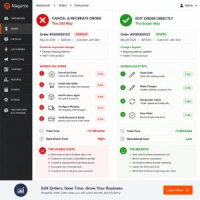
The Traditional Workaround
Without an order editing solution, administrators often follow this process:
- Cancel the original order
- Create a new order
- Add the correct products
- Remove unwanted products
- Configure shipping again
- Verify payment information
- Submit the replacement order
Although possible, this workflow consumes significant administrative time.
Problems With Canceling and Recreating Orders
Additional Workload
Support teams spend time rebuilding orders instead of helping customers.
Customer Confusion
Customers may receive cancellation notifications and assume something went wrong.
Inventory Complications
Stock reservations must be released and recalculated.
Reporting Challenges
Multiple orders are generated for what should be a single transaction.
Common Product Changes Merchants Need to Make
Add Products
Customers frequently decide to purchase additional items shortly after checkout.
Adding products directly to an existing order provides a better customer experience than creating a second order.
Remove Products
Sometimes customers accidentally order products they no longer need.
Administrators should be able to remove those items quickly and recalculate totals automatically.
Replace Products
Product replacement is especially common in fashion, electronics, and configurable product catalogs.
Examples include:
- Changing T-Shirt size
- Changing color options
- Switching product variants
- Upgrading to premium products
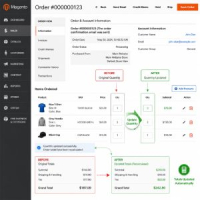
Update Quantities
Customers may want to increase or decrease quantities after placing an order.
Quantity adjustments should update pricing and totals automatically.
Why Product Changes Affect More Than Products
When products are modified, several other parts of the order may also change.
- Subtotal
- Tax Amount
- Discount Amount
- Shipping Charges
- Grand Total
A proper order editing workflow should recalculate all affected values automatically.
Inventory Considerations
Inventory management is another critical factor.
When products are removed from an order, stock quantities should be restored appropriately.
When products are added, inventory availability should be validated before saving changes.
Real Example: Customer Ordered the Wrong Product
Imagine a customer purchases a blue T-shirt but intended to buy a black version.
Ten minutes later, they contact customer support requesting a change.
Without an order editing solution, the support team may need to:
- Cancel the original order
- Create a replacement order
- Add the correct product
- Verify payment information
- Recalculate totals
With a Magento 2 Order Editor, the administrator can simply remove the incorrect item and add the correct one directly within the existing order.
Business Benefits of Editing Products Directly
- Faster customer support
- Reduced order cancellations
- Improved customer satisfaction
- Better inventory accuracy
- Cleaner reporting
- Lower operational costs
How MageHQ Order Editor Helps
MageHQ Order Editor enables administrators to manage product changes directly from the Magento backend.
Store administrators can:
- Add products to existing orders
- Remove products from orders
- Replace incorrect items
- Update quantities
- Automatically recalculate totals
- Maintain the original order record
- Reduce administrative workload
Best Practices for Product Modifications
- Confirm customer requests before making changes
- Verify inventory availability
- Review updated order totals
- Notify customers after modifications
- Keep change history for auditing purposes
Conclusion
Product modification requests are unavoidable in eCommerce.
Whether customers want to add products, remove items, replace products, or update quantities, merchants need an efficient process for handling these changes.
Instead of canceling and recreating orders, editing products directly within the existing order saves time, improves customer satisfaction, and reduces operational complexity.
For Magento stores handling post-purchase modification requests regularly, a dedicated Order Editor can dramatically improve order management workflows.
Frequently Asked Questions
Can I add products to an existing Magento 2 order?
Magento does not provide a simple built-in workflow for adding products after order placement. Many merchants use an Order Editor extension to accomplish this.
Can I remove products from a Magento order?
Yes, with an advanced order editing solution administrators can remove items and recalculate totals automatically.
Will inventory update when products are removed?
This depends on the extension being used. A proper order editing solution should support inventory adjustments when items are removed.
Do order totals update automatically?
When products are added, removed, or replaced, totals should be recalculated to maintain accurate pricing.
Need to Modify Products in Existing Magento Orders?
MageHQ Order Editor allows administrators to add products, remove items, replace products, update quantities, modify shipping methods, and recalculate totals directly from the Magento backend.
Save time, reduce cancellations, and deliver a better customer experience.
Learn more Magento 2 Order Editor Extension