A customer places an order, receives the confirmation email, and a few minutes later contacts your support team with an urgent request:
"I entered the wrong shipping address."
If you manage a Magento store, you've probably encountered this situation many times.
Shipping address mistakes are one of the most common customer service requests after checkout. While the issue may appear simple, correcting an order address in Magento 2 is not always straightforward.
Without the right workflow, merchants often waste valuable time canceling orders, recreating transactions, adjusting inventory, and explaining the situation to customers.
In this guide, we'll explore why address mistakes happen, the business impact they create, and the most efficient way to update shipping information in Magento 2.
Why Customers Enter Incorrect Shipping Addresses
Customers make mistakes for many reasons.
Online shoppers often complete purchases quickly, especially when shopping from mobile devices.
Common causes include:
- Typing mistakes
- Missing apartment numbers
- Wrong postal codes
- Selecting an outdated saved address
- Browser autofill errors
- Moving to a new residence
- Purchasing gifts for another person
Even a small mistake can prevent successful delivery.
How Shipping Address Errors Impact Your Business
Address mistakes affect more than just logistics.
They can impact customer satisfaction, fulfillment efficiency, and profitability.
Additional Shipping Costs
Carriers often charge fees for address corrections, package rerouting, or redelivery attempts.
Delivery Delays
Incorrect addresses frequently result in missed delivery dates.
Customers expecting fast shipping may become frustrated when delays occur.
Higher Support Workload
Support teams spend additional time investigating issues and communicating with customers.
Negative Customer Experience
Customers remember delivery problems.
A poor shipping experience can negatively affect future purchases and customer loyalty.
Magento 2's Default Limitation
Magento 2 stores orders as finalized business transactions.
Once an order is created, the platform intentionally limits modifications to preserve transactional integrity.
As a result, administrators cannot simply open an order and update shipping details through the standard Magento interface.
This restriction becomes problematic when customers request address changes shortly after checkout.
The Traditional Magento Workflow
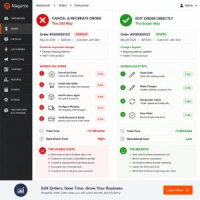
Without an order editing solution, merchants often follow a manual process:
- Cancel the original order
- Create a replacement order
- Re-enter customer information
- Add products again
- Reconfigure shipping settings
- Submit the replacement order
Although functional, this process is inefficient and introduces unnecessary risks.
The Hidden Problems of Canceling Orders
Inventory Adjustments
Canceled orders may require inventory reservations to be released and recalculated.
Reporting Complications
Multiple order records for a single purchase can create confusion in reports.
Customer Confusion
Customers may receive cancellation emails and assume their purchase failed.
Administrative Overhead
Support staff spend valuable time recreating information that already exists.
What Information Usually Needs Updating?
Address corrections frequently involve multiple fields.
- Customer Name
- Phone Number
- Company Name
- Street Address
- Apartment or Suite Number
- City
- State or Province
- Postal Code
- Country
Updating all related fields from one interface dramatically improves operational efficiency.
Shipping Method Changes Often Follow Address Changes
Many merchants overlook an important detail.
Changing a shipping address may affect available shipping methods and shipping costs.
For example:
- A new destination may belong to a different shipping zone.
- Carrier rates may increase or decrease.
- Express shipping options may become available.
- Certain shipping methods may no longer be valid.
Because of this, administrators often need to update both the shipping address and shipping method simultaneously.
Why Editing Existing Orders Is Better
Instead of rebuilding orders from scratch, merchants benefit from editing the original order directly.
This approach preserves:
- Order History
- Customer Communication Records
- Order Numbers
- Internal Reporting Consistency
Most importantly, it allows customer service teams to resolve issues much faster.
Real-World Example
A customer places an order for three products worth $250.
Ten minutes later, they contact support because they accidentally selected an old address stored in their customer account.
Without an order editing solution, the support team may need to:
- Cancel the order
- Create a replacement order
- Add products again
- Configure shipping
- Verify payment information
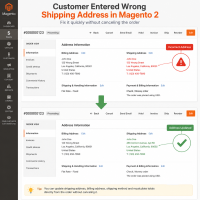
With an advanced Magento 2 Order Editor, the administrator simply updates the address and saves the changes.
The problem is solved in minutes.
Best Practices for Address Corrections
Verify Customer Identity
Always confirm that the request comes from the actual customer.
Update Before Shipment Creation
Address modifications are easier before fulfillment begins.
Review Shipping Costs
Address changes may affect carrier rates.
Document Important Changes
Maintain clear internal notes for future reference.
Notify Customers
Confirm successful updates via email whenever possible.
How MageHQ Order Editor Helps
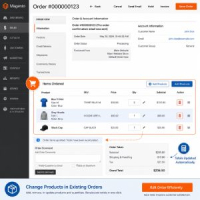
MageHQ Order Editor allows administrators to manage post-purchase modifications directly from the Magento backend.
Store managers can:
- Edit Shipping Addresses
- Edit Billing Addresses
- Edit Customer Information
- Update Shipping Methods
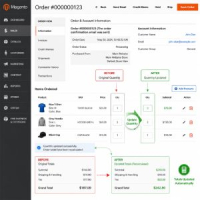
- Modify Products
- Adjust Quantities
- Recalculate Totals Automatically
- Maintain Existing Order Records
This creates a significantly faster workflow compared to canceling and recreating orders.
Benefits for Customer Service Teams
- Faster Resolution Times
- Reduced Administrative Work
- Fewer Order Cancellations
- Improved Customer Satisfaction
- More Accurate Deliveries
- Better Operational Efficiency
Conclusion
Shipping address mistakes are unavoidable in eCommerce.
The real challenge is having an efficient process to correct those mistakes before they affect fulfillment.
Magento's default workflow often forces merchants to cancel and recreate orders, creating unnecessary work and potential customer frustration.
By implementing a Magento 2 Order Editor, store administrators can quickly update shipping information, maintain accurate order records, and provide a better customer experience.
Frequently Asked Questions
Can I edit a shipping address in Magento 2 after an order is placed?
Magento does not provide a simple built-in workflow for editing shipping addresses after order creation. Many merchants use an Order Editor extension to manage these changes.
Why do customers frequently request shipping address changes?
Common reasons include typing errors, outdated saved addresses, missing apartment numbers, and incorrect postal codes.
Does changing the address affect shipping costs?
Yes. Different destinations may result in different shipping rates and available carriers.
Should I cancel the order and create a new one?
While possible, this approach increases administrative work and can confuse customers. Editing the existing order is generally more efficient.
Need to Correct Shipping Addresses Without Recreating Orders?
MageHQ Order Editor enables administrators to edit shipping addresses, billing addresses, customer information, products, quantities, shipping methods, and order totals directly from the Magento backend.
Explore Magento 2 Order Editor and streamline your order management workflow today.
The Smart Solution for Address Mistakes
Manually canceling and recreating an entire order just to fix a typo in the shipping address is a major hassle for your store administrators and frustrates customers.
With the Magento 2 Order Editor Extension, you can instantly modify incorrect shipping or billing addresses directly from the order grid. Keep your fulfillment process running smoothly without losing order data or harming the customer experience.