Managing customer orders efficiently is critical for every Magento store. While Magento 2 provides a robust order management system, many merchants quickly discover a limitation: editing an order after it has been placed is not straightforward.
In real-world eCommerce operations, customers frequently request changes after checkout. They may enter the wrong address, order the wrong product, choose the wrong shipping method, or decide to increase quantities before shipment. Handling these requests efficiently can significantly improve customer satisfaction and reduce administrative workload.
Why Order Changes Happen After Checkout
Even with a well-designed checkout process, mistakes happen. Customers often complete purchases quickly and only review their order afterward.
- Incorrect shipping address
- Wrong billing information
- Wrong product selection
- Incorrect quantity ordered
- Need to add another item
- Shipping method changes
- Customer contact information updates
These situations are common across nearly every Magento store.
Magento 2 Default Workflow
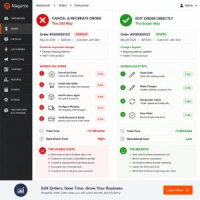
By default, Magento treats an order as a finalized transaction. Once an order is placed, administrators cannot easily modify core order data from the standard admin interface.
As a result, many stores follow this process:
- Cancel the original order.
- Create a replacement order.
- Re-enter customer information.
- Add products again.
- Reconfigure shipping.
- Generate a new order.
Although functional, this workflow consumes valuable time and can introduce additional errors.
Problems With Canceling and Recreating Orders
Increased Administrative Work
Customer service teams spend unnecessary time rebuilding orders.
Customer Confusion
Customers may receive cancellation notifications and worry that payment was unsuccessful.
Inventory Challenges
Stock levels and reservations may need additional adjustments.
Reporting Complexity
Multiple orders for the same purchase can complicate reporting and auditing.
What Should Be Editable?
An efficient Magento order editing solution should allow administrators to modify key order information without recreating the order.
- Customer Information
- Billing Address
- Shipping Address
- Order Items
- Product Quantities
- Shipping Methods
- Order Totals
Edit Customer Information
Customers occasionally provide incorrect email addresses, phone numbers, company names, or contact details. Correcting this information helps prevent communication issues and delivery problems.
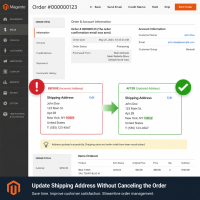
Edit Billing and Shipping Addresses
Address correction requests are among the most common post-purchase support requests.
Store administrators often need to update:
- Street address
- Apartment number
- City
- State
- Postal code
- Country
Having the ability to update both billing and shipping addresses directly from the order significantly improves support efficiency.
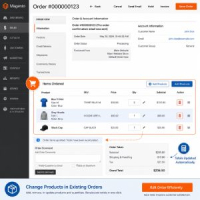
Add Products to Existing Orders
Customers sometimes contact support shortly after checkout and ask to add more products. Instead of creating a separate order, administrators can add items directly to the existing order.
This helps increase average order value while simplifying fulfillment.
Remove Products From Orders
If a customer accidentally orders the wrong item, administrators should be able to remove products from the order without starting over.
Order totals should automatically update after changes are made.
Update Product Quantities
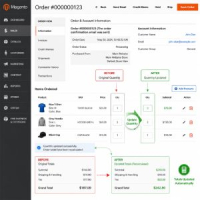
Quantity adjustments are another common request. Customers may want to increase quantities, reduce quantities, or correct duplicate purchases.
Direct quantity editing saves time and improves customer experience.
Change Shipping Methods
Customers may request faster shipping after placing an order. Administrators should be able to switch between available shipping methods and recalculate costs accordingly.
Automatic Order Total Recalculation
Whenever products, quantities, or shipping methods change, the order total should be recalculated automatically.
- Subtotal
- Shipping Charges
- Taxes
- Discounts
- Grand Total
Inventory Management Benefits
When products are removed from an order, inventory should be updated accordingly. This helps maintain accurate stock levels and reduces overselling risks.
Benefits of Using a Magento 2 Order Editor
- Save administrative time
- Reduce cancellations
- Improve customer satisfaction
- Maintain order history
- Reduce fulfillment errors
- Increase operational efficiency
Real-World Example
A customer places an order for two products and selects standard shipping. Ten minutes later, they contact support and request:
- Add one more product
- Change quantity of an existing item
- Update the shipping address
- Upgrade to express shipping
Without order editing capabilities, the administrator may need to cancel and recreate the entire order. With a dedicated Order Editor, these changes can be completed directly from the existing order.
Best Practices
- Verify customer identity before making changes.
- Document significant modifications.
- Review totals after edits.
- Update orders before shipment creation whenever possible.
- Communicate changes clearly to customers.
Conclusion
Magento 2 provides powerful commerce capabilities, but post-purchase order management often requires additional flexibility. Customers regularly request changes after checkout, and merchants need efficient tools to handle those requests.
By using a Magento 2 Order Editor, administrators can update customer information, addresses, products, quantities, shipping methods, and totals directly from the admin panel without canceling and recreating orders.
Need to Update Shipping Addresses Without Recreating Orders?
MageHQ Order Editor allows administrators to edit shipping addresses, billing information, shipping methods, products, quantities and order totals directly from the Magento backend.