Order Editor for Magento 2

In stock
- SKU
- order-editor
Why Editing Orders in Magento 2 Is Difficult
By default, Magento 2 does not allow store admins to edit customer orders easily after they are placed. In many cases, administrators must cancel the original order and create a completely new one.
This process is time-consuming and can lead to:
- Customer frustration
- Inventory inconsistencies
- Accounting complications
- Delayed order processing
- Increased support workload
MageHQ Order Editor solves this problem by allowing admins to edit orders directly from the Magento admin panel without canceling existing orders.
Edit Magento 2 Orders Without Canceling
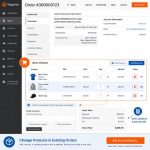
Magento 2 Order Editor allows store administrators to modify customer orders directly from the Magento admin panel without canceling and recreating orders manually.
What You Can Edit
- Customer account information
- Billing and shipping addresses
- Payment and shipping methods
- Ordered products and quantities
- Order comments and additional details


Update Billing & Shipping Addresses in Magento 2
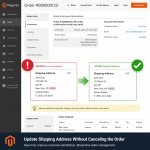
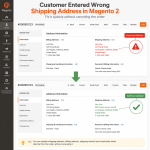
Update billing and shipping addresses directly from the Magento admin panel after checkout.
Correct customer delivery information instantly without canceling existing orders.
- Edit billing and shipping addresses after checkout
- Correct customer delivery information instantly
- Reduce order cancellations and manual admin work
- Improve Magento order management workflows
Update Shipping Methods in Magento 2
Magento 2 Order Editor allows store administrators to quickly change shipping methods and update shipping information directly from the Magento admin panel.
This helps merchants handle customer delivery requests, adjust shipping costs, and correct shipping-related issues without canceling and recreating orders.
- Change shipping methods after checkout
- Update shipping rates and handling fees
- Reduce manual order management work
- Improve customer support workflows

Edit Order Items and Quantities
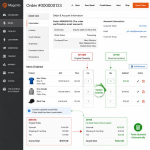
Easily modify ordered products, quantities, pricing, discounts, and taxes directly from the Magento admin panel without canceling existing orders.
TEdit ordered products, quantities, pricing, discounts, and taxes directly from the Magento admin panel.
Order totals are recalculated automatically after modifications.
- Edit products and quantities after checkout
- Update pricing, taxes, and discounts instantly
- Automatically recalculate order totals
- Reduce manual corrections and order cancellations

Automatically Restock Returned Items
Automatically restock removed or canceled items back to inventory during order editing.
Maintain accurate stock quantities and reduce manual inventory adjustments.
- Automatically restock removed items
- Maintain accurate inventory quantities
- Reduce manual stock adjustments
- Improve Magento inventory management


Generate New Invoices, Shipments, and Credit Memos
Automatically generate updated invoices, shipments, and credit memos after editing customer orders.
Keep Magento order records accurate and organized.
- Create updated invoices automatically
- Generate new shipments after order changes
- Create and manage credit memos
- Keep Magento order records accurate
Magento Default vs MageHQ Order Editor
| Feature | Default Magento | MageHQ Order Editor |
|---|---|---|
| Edit existing orders | ❌ | ✅ |
| Update shipping methods | ❌ | ✅ |
| Modify products & quantities | ❌ | ✅ |
| Edit billing & shipping addresses | ❌ | ✅ |
| Avoid order cancellations | ❌ | ✅ |
| Update payment information | ❌ | ✅ |
| Generate invoices & shipments | ❌ | ✅ |
| Improve admin order workflow | ❌ | ✅ |
Frequently Asked Questions
Can Magento 2 edit orders by default?
Magento 2 has limited order editing capabilities by default. In most cases, administrators must cancel and recreate orders manually to make changes. MageHQ Order Editor allows store admins to modify existing orders directly from the Magento admin panel.
Can I edit products in existing Magento 2 orders?
Yes. The extension allows administrators to add, remove, or modify products and quantities directly within existing customer orders without canceling the order.
Can I update billing and shipping addresses after checkout?
Yes. MageHQ Order Editor allows you to edit billing and shipping addresses directly from the Magento admin panel after the order has been placed.
Can I change shipping methods in Magento 2 orders?
Yes. Store administrators can update shipping methods, shipping rates, and shipping information without recreating the order manually.
Does the extension support Magento 2.4.x?
Yes. The extension supports Magento Open Source and Adobe Commerce versions 2.3.x and 2.4.x.
Can I edit invoiced orders in Magento 2?
Yes. The extension supports editing invoiced orders and allows administrators to generate updated invoices, shipments, and credit memos when necessary.
Will the extension recalculate order totals automatically?
Yes. Order totals, taxes, discounts, and shipping amounts are recalculated automatically after order modifications.
Can removed products be restocked automatically?
Yes. MageHQ Order Editor can automatically restock removed or canceled items back into Magento inventory during the order editing process.
Does the extension support Adobe Commerce?
Yes. The extension is compatible with both Magento Open Source and Adobe Commerce installations.
Can I modify payment information after order placement?
Yes. Administrators can update payment-related information directly from the Magento admin panel depending on the payment workflow configuration.
Does MageHQ Order Editor require coding knowledge?
No. The extension is designed for Magento store administrators and can be managed directly through the Magento admin interface without coding.
Can I use the extension for B2B Magento stores?
Yes. The extension is suitable for both B2C and B2B Magento stores that frequently manage customer order changes.
Does the extension improve Magento order management workflows?
Yes. MageHQ Order Editor helps reduce manual order processing, improve customer support efficiency, and simplify Magento order management workflows.
Is technical support included?
Yes. MageHQ provides technical support and regular extension updates to ensure compatibility with supported Magento versions.
Customer Reviews
You can not add the review on this product as you have not purchased this product yet.
Why Choose MageHQ?
MageHQ develops reliable Magento 2 extensions focused on performance, compatibility, and simplified store management workflows.
Magento-Focused Development
We specialize in Magento 2 extensions built specifically for real-world eCommerce workflows and Magento store operations.
Clean & Optimized Code
Extensions are developed following Magento coding standards to ensure stability, performance, and maintainability.
Fast Technical Support
Our support team is available to help with installation, configuration, compatibility, and extension-related questions.
Easy Installation & Configuration
Simple installation and user-friendly configuration help merchants and developers get started quickly.