For a high-volume Magento 2 store, system downtime isn't just an inconvenience—it is an immediate financial hemorrhage. When a critical checkout function breaks, a payment gateway drops, or a shipping calculation fails, every minute of delay means lost revenue, abandoned carts, and frustrated customers.
Surprisingly, the vast majority of e-commerce site crashes are not caused by hardware failures or hosting issues. They are caused by human error—a misplaced character in a system configuration, a misconfigured shipping table, or an accidental deletion of a core CMS block by a backend administrator.
The Traditional Troubleshooting Nightmare
When a store experiences a sudden malfunction, the traditional diagnostic process is chaotic, expensive, and stressful:
- Developers are pulled into an emergency call to inspect raw system logs.
- Teams review lines of server code to find out if a recent deployment caused the bug.
- Managers blindly question everyone who had backend access over the last 24 hours.
- Databases are manually compared against older backups, risking data loss for recent transactions.
This disorganized approach can leave a store crippled for hours, resulting in thousands of dollars in lost opportunities.
The Instant Fix: Tracking Down the Source of Error
Debugging becomes effortless when you know exactly what changed right before the crash occurred. A dedicated audit trail turns blind debugging into a precise, targeted fix.
The MageHQ Admin Action Log for Magento 2 acts as your storefront's flight data recorder, providing an instant timeline of events:
| What Breaks The Store | How MageHQ Solves It Instantly |
|---|---|
| Accidental Payment Method deactivation during maintenance. | Filter logs by "System Configuration" to locate the exact modified toggle. |
| Corrupted promotional coupon code crashing the cart page. | Isolate recent actions under "Cart Price Rules" to find the problematic syntax. |
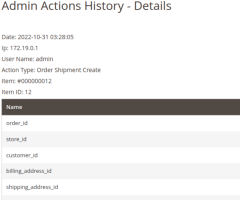
| Deleted layout block breaking the homepage design. | Identify the exact timestamp and username responsible for the CMS removal. |
From Hours of Investigation to a Two-Minute Restoration
Imagine this scenario: Your customer support desk is suddenly flooded with emails stating that the "Place Order" button is non-responsive. Your technical team is baffled because no new code code was deployed today.
Step 1: The lead developer opens the MageHQ Admin Action Log interface.
Step 2: They filter the records to display the last 30 minutes of activity across all admin accounts.
Step 3: The log immediately points to a record: An internal SEO agent updated a third-party tracking script inside the HTML Head configuration 15 minutes ago, introducing a syntax error that broke JavaScript execution across the checkout flow.
Instead of hours of complex code review, the developer removes the bad script snippet in less than two minutes. The storefront is restored, and transactions resume immediately.