When evaluating the security and operational transparency of an e-commerce platform, merchants often ask a fundamental question: "Doesn't Magento 2 already track administrative actions out of the box?" The short answer is yes, but with massive limitations depending on the version you run.
While Magento Enterprise Edition (Adobe Commerce) includes an admin logging utility, Magento Open Source leaves store owners virtually in the dark. Furthermore, even built-in features often fail to deliver the granular, user-friendly data required to quickly solve operational mistakes. Let’s break down the precise technical gaps between default logging and an advanced extension architecture.
Feature-by-Feature Comparison Matrix
To understand what your management team is missing, consider how Magento Open Source, Adobe Commerce default utilities, and the MageHQ extension handle administrative logging side-by-side:
| Operational Capabilities | Magento Open Source | Adobe Commerce (EE) | MageHQ Extension |
|---|---|---|---|
| Visual Admin Interface | None (Raw server text logs only) | Basic Grid View | Advanced Dynamic Grid |
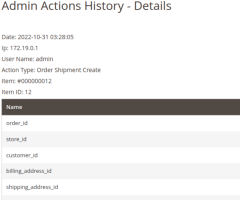
| Granular CRUD Tracking | Extremely Limited | Standard Actions | Complete Object Audit |
| Failed Login Analytics | Server level only | Fragmented records | Dedicated Security Tab |
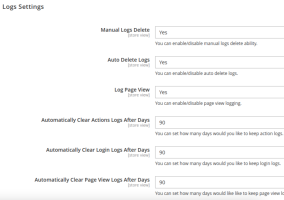
| Automated Log Cleaning | Requires manual Cron scripts | Basic rotation | Configurable Auto-Purge |
Three Critical Gaps in Default Magento Logging
1. The "Raw Text File" Nightmare (Open Source)
If you run Magento Open Source, backend actions are hidden away inside system log files stored on your hosting server (such as var/log/system.log). For a busy merchant, these files quickly swell to millions of rows of unformatted, unreadable text. If you want to know who modified a specific catalog price yesterday, your technical team must manually download and parse these logs using terminal commands—a massive waste of expensive engineering hours.
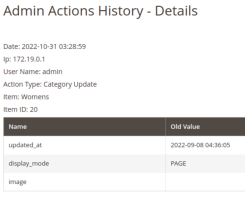
2. Lack of Explicit "Before-and-After" Details
Standard logging mechanisms might tell you *that* a configuration form was saved by an admin user. However, they rarely capture the explicit delta—the exact data values before the modification occurred vs. the new value saved. Without this explicit comparison layer, you cannot easily deduce whether an admin user resolved a systemic issue or introduced a critical syntax error.
3. Significant Cost Barriers
To gain access to basic native administrative logging grids, merchants must step up to Adobe Commerce licenses, costing thousands of dollars annually. For expanding mid-market companies utilizing the flexible Open Source framework, spending that amount just to achieve basic administrative visibility is financially unjustifiable.
Why MageHQ Admin Action Log is the Intelligent Choice
The MageHQ Admin Action Log for Magento 2 acts as a premium bridge, delivering enterprise-grade tracking capabilities to your Magento workspace at a minute fraction of the cost.
- Intuitive Search and Filter Grid: Search activities instantaneously by Admin User, Action Type (Save, Delete, Load), Module Target, or Date Range directly from your Admin Control Panel.
- Automated Database Optimization: Prevent database bloat. Easily set an automated cleaning interval (e.g., automatically clear entries older than 60 or 90 days) to keep your database lean and your server fast.
- Instant Developer Diagnostics: Provide your maintenance developers with exact insight into systemic changes, transforming long structural diagnostics into a simple two-minute review process.