As an e-commerce merchant, your Magento 2 backend is the brain of your entire business. It contains sensitive customer data, proprietary pricing structures, payment gateway configurations, and order histories. This high concentration of valuable assets makes your admin panel a prime target for malicious actors and cyber criminals.
While standard security measures like strong passwords and Two-Factor Authentication (2FA) are essential, they are no longer enough on their own. If a hacker manages to compromise an admin credential, how quickly would you notice? Without a detailed monitoring system, unauthorized users could manipulate your store for weeks undetected. This is where an advanced Admin Action Log becomes your ultimate line of defense.
The Vulnerability of the E-Commerce Backend
Hackers rarely attack a storefront directly; instead, they target the administrative infrastructure. Common attack vectors include:
- Brute-Force Attacks: Automated bots continuously guessing passwords until they find a match.
- Credential Stuffing: Using leaked passwords from other data breaches to gain access to your admin panel.
- Inside Threats: Compromised employee devices or disgruntled staff executing malicious changes intentionally.
Once inside, a malicious actor can quietly inject skimming scripts to steal credit card data at checkout, alter bank routing information, or export your entire customer database to the dark web. The financial and reputational fallout from such events can ruin an e-commerce brand overnight.
Early Warning Signs: How Action Logs Spot Breaches
Security breaches leave footprints. By actively tracking and logging backend behavior, you can catch anomalous activities before they escalate into full-scale data disasters. Look out for these critical red flags in your logs:
1. Unusual Login Patterns
Did a high-level administrator log in at 3:00 AM from an unfamiliar IP address or a foreign country? If your staff operates strictly out of a specific regional office during standard business hours, an unexpected login session is a strong indicator of compromised credentials.
2. Rapid, Automated Modifications
Humans work at a deliberate pace. If your logs show dozens of product prices, CMS pages, or system configurations being altered within a single minute, it usually implies that an automated script or a malicious bot is altering your database.
3. Sudden Alterations to System Configurations
Be extremely wary of unauthorized changes to core system configurations, such as modified payment gateway endpoints, new web webhooks, or freshly created admin accounts with full privileges that no one authorized.
Turn Your Logs into a Shield with MageHQ Admin Action Log
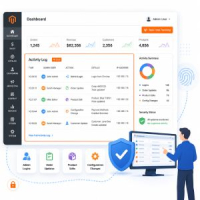
Magento 2 open-source lacks a robust, visual, and comprehensive tracking dashboard out of the box. To bridge this critical security gap, the MageHQ Admin Action Log for Magento 2 provides real-time transparency and detailed accountability over your backend environment.
Key Security Features:
- Complete Login History: Track every login attempt, including successful entries, failed passwords, specific IP addresses, browser user-agents, and precise timestamps.
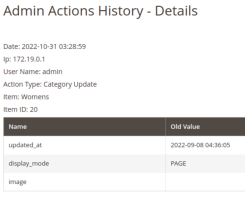
- Detailed Action Tracking (CRUD): Log exactly who Created, Read, Updated, or Deleted any piece of data across Products, Categories, Orders, Customers, and System Configurations.
- IP Whitelisting & Alerts: Easily pinpoint access requests coming from outside your approved corporate networks or geolocations.
- Tamper-Proof Data Architecture: Ensure that even if a lower-level admin account is compromised, the logs remain secure, organized, and available for forensic investigation.
Real-World Scenario: Stopping a Skimming Attack
Imagine a hacker acquires an employee's password via a phishing email. They log into your Magento backend and alter the Miscellaneous HTML configuration to inject a malicious JavaScript snippet that steals credit cards.
Without MageHQ: The script runs silently. Weeks pass, customers complain about fraud, payment processors fine your business, and your reputation is shattered.
With MageHQ: Your security team reviews the Admin Action Log daily. They instantly notice a "System Configuration Updated" log generated at midnight by an unauthorized IP. Within minutes, you identify the exact compromised account, roll back the malicious change, terminate the session, and force a password reset—neutralizing the breach before a single customer is harmed.